


Skyline Bowling
4.51.79K Reviews
App Specs
- Version
- 3.29
- Updated On
- License
- Free
- Downloads
- 1,000,000+
- Developer
- VOODOO
- Categories
- Sports
- Platform
- Android, iOS
Screenshots
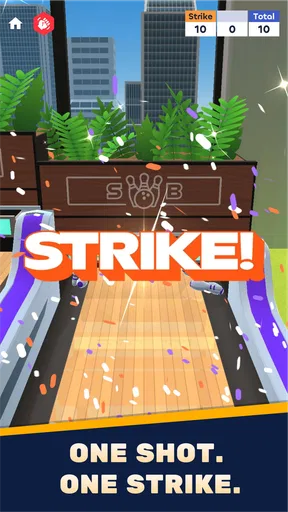
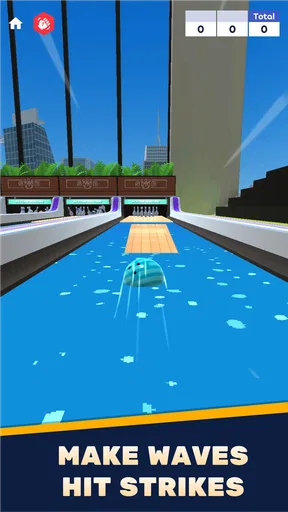
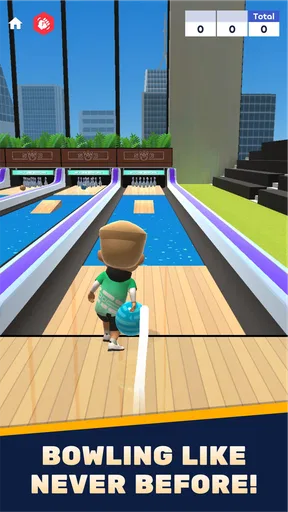
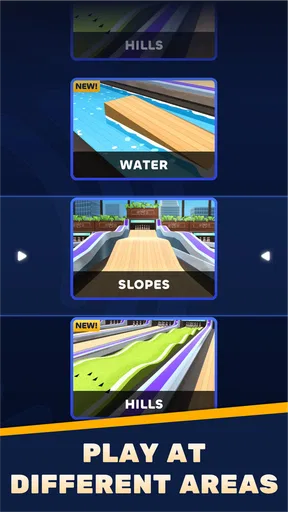
 Analysis by AppCompare
I approach Skyline Bowling as a quick sports game rather than a replacement for a real bowling session. Its appeal is the simple pleasure of lining up a shot, sending the ball down a lane, and seeing how the pins fall, with a presentation built around city-themed settings. That makes it easy to pick up when I have a few spare minutes, while the aiming and throw adjustments give me something to work on beyond tapping through a round.
Who will enjoy a few frames
I’d recommend it to people who like arcade-style sports games and want a bowling game that feels approachable from the first session. You don’t need to know bowling terminology to understand the basic goal, and the short, direct interaction suits a commute break or a quiet moment at home. If you enjoy improving a score through small changes in timing and aim, there’s a reason to return beyond simply seeing the visuals.
It is less suitable if you want a detailed simulation of real bowling, with the emphasis on faithfully reproducing every part of the sport. The presentation and touch controls make this feel like a mobile game first. I’d also look elsewhere if you strongly prefer a plain, traditional lane and minimal visual flair; the skyline styling is part of the identity here, not just background decoration.
A practical way to play
In an everyday session, I’d open it while waiting for a friend or winding down after work, play a few rounds, and stop when I’ve had my fill. To get more from each attempt, I’d change one part of my throw at a time rather than adjusting power and spin together. That makes it easier to tell whether a miss came from the line, the force, or the amount of curve. It is a small habit, but it turns casual retries into useful practice instead of guesswork.
I’d also treat a new alley or visual setting as a chance to recheck my aim rather than assuming the same movement will always produce the same result. The game’s varied maps and special abilities suggest that the experience is not only about repeating an identical lane, so experimenting patiently is more rewarding than forcing one familiar approach. When a shot goes wrong, I’d take a moment to notice where the ball finished and adjust the next throw accordingly.
Where it sits among bowling games
Compared with a basic bowling app that focuses on familiar frames and a straightforward score, this one leans toward a more playful, changing presentation. That can make it a better fit when I want a quick visual change of pace, but it may not be the best pick for someone who values a restrained sports simulation above everything else. Against broader arcade sports games, its advantage is that the bowling action remains the central attraction rather than one activity among many.
The trade-off is that a game built around repeatable throws can feel familiar once the novelty of a setting wears off. I’d play it for the moment-to-moment aiming and the chance to explore its different environments, not because every session promises a radically different sport. If I wanted a deeper competitive structure or a realistic practice tool, I’d choose an option designed specifically around those priorities.
Worth Reading Before You Choose

Flipboard Shows What News Apps Must Do Beyond the Feed

Switching to Android Auto Means Rethinking Your Driving Routine

Google Calendar Makes a Crowded Week Easier to Manage

Ludo King Makes the Most of the Minutes Between Plans

Baby Panda World Brings Quick Play to Modern Phones, but Its Game Library Feels Busy

ESPN’s Live Game View Makes Following Close Games Easier
First Impressions and Gameplay
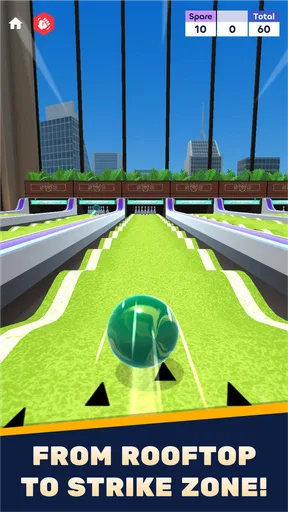
As soon as I launched Skyline Bowling, I was immediately struck by its sleek and colorful interface. The developers have clearly put a lot of thought into making the app visually appealing. The graphics are top-notch, with realistic bowling alleys set against stunning city skylines that make you feel like you're right there in the action.
The gameplay itself is incredibly intuitive. You simply swipe to roll the ball down the lane, but don't be fooled by its simplicity. The game offers a surprising amount of depth. You can adjust the spin and power of your throw, which adds a layer of strategy as you aim for that perfect strike. I found myself getting lost in the game, trying to beat my high score and unlock new levels.
Features and Customization
One of the things I love most about Skyline Bowling is the variety it offers. The game features multiple modes, including a single-player campaign, multiplayer tournaments, and even a challenge mode where you can compete against friends. It's perfect for those moments when you're looking to kill some time or engage in a bit of friendly competition.
Customization is another big plus. The app allows you to personalize your bowling ball with different colors and patterns. You can also unlock new alleys as you progress, each with its own unique theme and challenges. This not only keeps the game fresh but also encourages you to keep playing to see what comes next.
Sound and Music
Now, let's talk audio. The sound effects in Skyline Bowling are spot-on. From the satisfying clatter of pins falling to the ambient city sounds in the background, the audio enhances the gaming experience. The music is upbeat and catchy, though I did find myself turning it down a bit to focus on my throws.
User Experience and Interface
Navigation through the app is a breeze. The menus are straightforward, and I didn't encounter any glitches or bugs during my playtime. The developers have clearly prioritized a smooth user experience, which is always a win in my book. Plus, the app doesn't bombard you with ads, which is a refreshing change from other games in the genre.
What to know before installing
It’s free to download, so trying a few rounds does not require an upfront purchase. The game is made by VOODOO, has a Teen content rating, and is currently at version 3.26. It requires Android 8.0 or later. Optional in-app purchases range from $0.49 to $134.99 per item, so I’d check purchase prompts carefully, especially if a younger player will be using the device. The age rating is worth keeping in mind even though the core activity is bowling.
Its audience numbers suggest it has found a sizable mobile following: it has over a million installs, an average rating of 4.5 from around 11,000 ratings, and roughly 1,600 written reviews. Those figures can help set expectations, but they don’t guarantee that its controls or pace will suit every player. I’d use the free entry point to decide whether the style clicks before spending anything.
What has changed, and what that means
The game was released on May 16, 2023, and its current version is 3.26. That gives existing players a concrete point of reference: they are using a product that has moved on from its initial release, rather than a game still presented as a brand-new launch. The version number alone does not tell me what changed in each update, so I wouldn’t assume a particular new mode, balance adjustment, or fix without seeing it in the game.
For returning players, the practical question is whether the current build still offers the kind of short bowling sessions they enjoyed before. I’d check the installed version if something feels different, then judge the controls and available maps in play rather than relying on assumptions about a numbered update. For someone arriving fresh, the current release is the relevant starting point; the more important test is whether its particular mix of aiming, visual variety, and repeat play feels enjoyable.
Limitations and sensible expectations
The central loop still asks you to repeat a familiar action: line up, choose how to throw, and watch the result. If that is satisfying, small improvements to your accuracy can hold my attention. If you quickly tire of repeating a mechanic, changing scenery may not be enough to keep you engaged. I’d approach it as a casual game to dip into, rather than expecting a long-form sports career or a substitute for bowling with friends in person.
There is also a practical distinction between an enjoyable solo session and a social one. The published description points to special abilities and distinctive maps, but I wouldn’t install it solely on the assumption that every kind of competition or multiplayer option will match a particular group’s needs. If playing together is your main reason to download, check what is available in the current game before arranging a session. If you mainly want a quick personal challenge, that uncertainty matters much less.
For parents, I’d pair the Teen rating with a quick look at the purchase options and device settings before handing the game over. The low-cost entry price is appealing, but optional items span a wide range, so it makes sense to prevent accidental purchases if that is a concern. For adults, the same point is simple: enjoy the free starting experience, and only consider spending if you know what an item adds and genuinely want it.
Final Thoughts
So, is Skyline Bowling worth the download? Absolutely! It's a fantastic mix of fun and challenge that keeps you coming back for more. Whether you're aiming for strikes or just enjoying the beautiful cityscapes, this app delivers on all fronts. It's perfect for short gaming sessions or when you're in the mood to dive deep into the world of virtual bowling.
Ready to take on the lanes? You can find Skyline Bowling available for download on both Android and iOS. Trust me, you won't want to miss out on this strike of a game!
What I’d watch for next
If I were deciding whether to keep playing over time, I’d pay attention to how the available maps and special abilities affect the feel of a round, rather than judging the game only by its first few throws. Those are the elements most likely to distinguish its bowling from a plain lane-and-score experience. I’d also watch whether the current version remains comfortable on my device and whether the balance between free play and optional purchases feels fair for my habits.
My overall recommendation is therefore specific: try it if you want a colorful, easy-to-start bowling game for short sessions and enjoy refining a swipe-based throw. Skip it if realism, a guaranteed deep competitive format, or a no-purchase environment is essential to you. For me, the strongest reason to give it a chance is the combination of accessible bowling controls with changing settings; the main reason to keep expectations measured is that the core action remains a repeatable arcade loop.
Pros
- Intuitive controls make gameplay smooth.
- Variety of bowling alleys to unlock.
- Realistic physics enhance immersion.
- Daily challenges keep engagement high.
- Multiplayer mode for competitive fun.
Cons
- Ads can interrupt gameplay frequently.
- In-app purchases can be pricey.
- Limited customization for avatars.
- Graphics can be glitchy on older devices.
- Requires constant internet connection.
FAQs for Skyline Bowling
What are the main features of Skyline Bowling?
Skyline Bowling offers an immersive bowling experience with stunning 3D graphics and realistic physics. The game includes multiple modes such as single-player, multiplayer, and tournament play. Players can customize their bowling balls and alleys, and participate in daily challenges to earn rewards. It also features leaderboards to compete with friends and global players.
Is Skyline Bowling free to play?
Skyline Bowling is free to download and play. However, it includes in-app purchases that allow users to buy additional features, such as premium bowling balls, exclusive alleys, and power-ups. While these purchases enhance gameplay, they are not necessary to enjoy the full experience of the game.
Does Skyline Bowling require an internet connection?
Skyline Bowling can be played offline in single-player mode, which makes it convenient for users without a stable internet connection. However, to access multiplayer modes, tournaments, and leaderboard features, an internet connection is required. Playing online also allows for syncing progress across devices.
What devices are compatible with Skyline Bowling?
Skyline Bowling is available on both Android and iOS platforms. It supports a wide range of devices, but for the best experience, it is recommended to have a device with at least 2GB of RAM and a recent operating system version. Always check the app store for specific compatibility details before downloading.
How can I resolve technical issues or bugs in Skyline Bowling?
If you encounter any technical issues or bugs while playing Skyline Bowling, first ensure that you have the latest version of the app installed. Restarting your device can also help. For persistent problems, contact the support team through the app or visit their website for troubleshooting guides and updates on known issues.


